Settings
Configure recording defaults, destinations, NMOS, and logging. Select the Settings icon from source selection or the capture view.
Choose a page in the sidebar, then select Done to save changes. Cancel, the dialog's close button, or Escape discards unsaved field changes.
Recording defaults apply to subsequent captures. Configure them before starting the next recording.
Actions are not undone by Cancel
License file operations, clipboard actions, and opening external links take effect separately from settings changes. Cancel does not undo those actions.
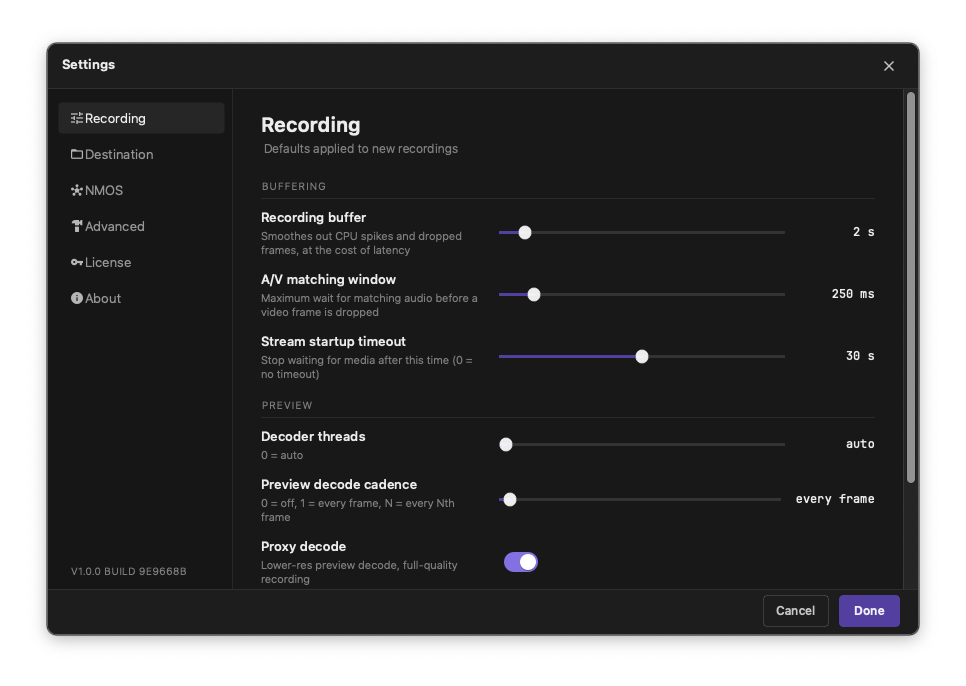
Recording
| Setting | Values and purpose |
|---|---|
| Recording buffer | 1-15 seconds; sets the recording buffering duration. |
| Decoder threads* | auto or a thread count up to the available CPU count. |
| Preview decode cadence* | off, every frame, or every Nth frame, up to 60. A larger interval decodes fewer preview frames. off disables preview rendering without disabling recording. |
| Proxy decode* | Uses a lower-resolution preview while keeping the recording at full quality. |
* Affects monitoring, not the quality of the recorded JPEG XS essence.
Destination
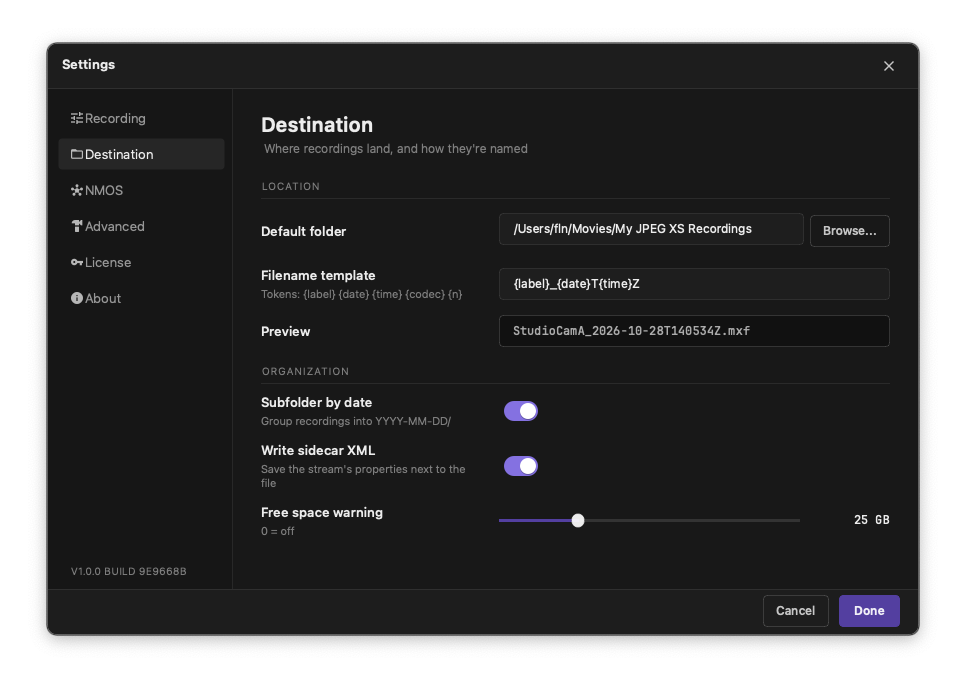
| Setting | Purpose |
|---|---|
| Default folder | Sets the destination used by the main recording view. Enter a path or use Browse. |
| Filename template | Builds the recording filename from text and the tokens below. |
| Subfolder by date | Groups recordings into YYYY-MM-DD subfolders using the UTC date. |
| Write sidecar XML | Writes an XML metadata file alongside the recording. |
| Free space warning | Warns when available space is below the selected threshold, from 1-100 GB. Set to 0 to disable the warning. A warning does not prevent recording from starting. |
| Filename token | Replacement |
|---|---|
{label} |
Recording label or the fallback recording name |
{date} |
UTC date in YYYY-MM-DD format |
{time} |
UTC time in HHmmss format |
{codec} |
jpegxs |
{n} |
Sequence number, starting at 001 |
For example, {label}_{date}_{time} can produce CameraA_2026-10-01_143000.mxf. Recordings use the .mxf extension. Existing files are not overwritten: a sequence number is advanced or appended to choose an unused filename. An empty template uses {label}_{date}T{time}Z.
The current settings preview uses sample values and incorrectly shows a .mkv extension. Actual recordings are MXF. Use Stream info > Recording to check the capture's output path.
NMOS
NMOS provides source discovery and receiver connection control. Coordinate these settings with your network administrator.
| Setting | Purpose |
|---|---|
| Enable NMOS | Enables or disables NMOS operation. |
| Heartbeat interval | Sets the registry refresh interval, from 100-12000 ms. |
| Incompatible streams | Hides incompatible sources or shows them as disabled rows. |
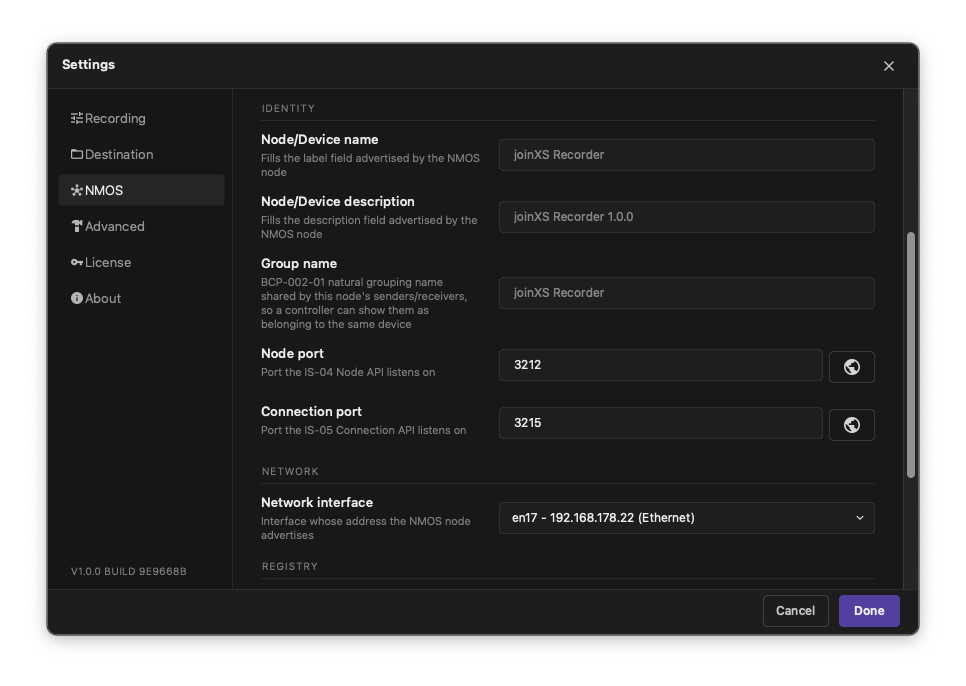
| Node/Device name | Sets the advertised name. Leave empty to use the application name. |
| Node/Device description | Sets the advertised description. Leave empty to use the application name and version. |
| Group name | Sets the advertised BCP-002-01 grouping name. Leave empty to use the application name. |
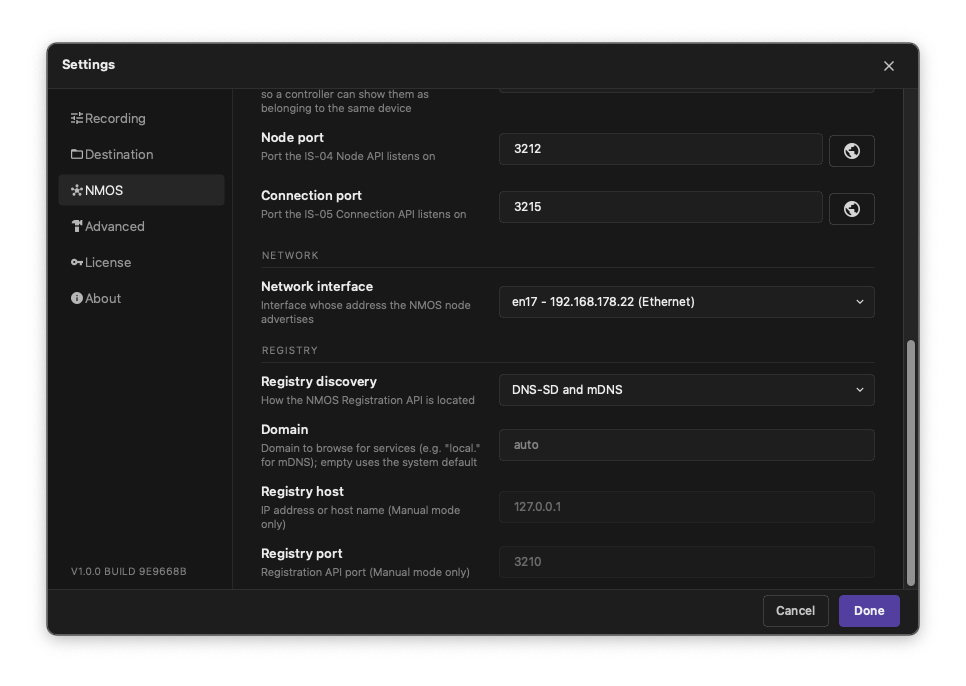
| Node port | Sets the IS-04 API port, from 1-65535; default: 3212. |
| Connection port | Sets the IS-05 API port, from 1-65535; default: 3215. |
| Network interface | Selects the adapter for NMOS operation. |
| Registry discovery | Chooses DNS-SD and mDNS, DNS-SD only, mDNS only, or Manual. |
| Domain | Overrides the discovery domain. Leave empty to use the system default. |
| Registry host / Registry port | Sets the host or IP address and port when discovery is Manual. These fields are disabled for automatic discovery. |
For a manually configured registry:
- Enable NMOS and select the network interface.
- Set Registry discovery to Manual.
- Enter the registry host and port supplied by your administrator.
- Select Done, then check Available streams.
Scroll down to reach the network and registry fields. Changes apply only after Done. The buttons with the globe icon launches a browser at the local Node or Connection API using the displayed port; opening a link does not save changes or start an API listener.
Firewall and Windows permissions
Local and network firewall settings, especially on Windows, can prevent the NMOS receiver node from being discovered, discovering other nodes, or receiving streams entirely. Ask your network administrator to check the active network profile and rules for discovery traffic, the Node and Connection APIs, communication with the registry, and incoming stream traffic on the selected network interface. The installer configures HTTP URL reservations but does not open firewall ports; network access may require separate firewall rules.
Reserving HTTP URLs for standard users on Windows
The NMOS node runs a web server for its IS-04 Node and IS-05 Connection APIs. During an NMOS-enabled Windows installation, the installer prompts for the Node and Connection ports (defaults: 3212 and 3215) and creates machine-wide HTTP URL reservations for Everyone. The installer requires elevation to create these reservations; after setup, standard users can run joinXS Recorder without launching it as an administrator.
The installer saves the selected ports as machine-wide application defaults. Existing per-user NMOS settings take precedence, so check Settings > NMOS and make sure the actual Node port and Connection port match the reservations. If a reservation already exists with conflicting permissions, the installer does not replace it and reports an error; ask an administrator to inspect the existing reservation.
Changing either port later in Settings > NMOS does not update its reservation. Ask an administrator to reserve the new port with the commands below, or rerun the installer and select ports that match the settings. Rerunning the installer does not change existing per-user settings, so verify the configured values before using NMOS.
Setup and uninstallation leave existing reservations in place because other applications or user profiles may still need them. Ask an administrator to review unused reservations before removing them.
- Check the Node port and Connection port in Settings > NMOS and save any changes with Done.
-
Ask an administrator to open Command Prompt with Run as administrator and run the following commands for the default ports:
netsh http add urlacl "url=http://*:3212/" "sddl=D:(A;;GX;;;S-1-1-0)"
netsh http add urlacl "url=http://*:3215/" "sddl=D:(A;;GX;;;S-1-1-0)"
Replace
3212and3215with the configured ports if they differ. Registry port identifies the remote Registration API; it is not a local listener and does not need a reservation on the Recorder computer. -
Restart joinXS Recorder as the standard user. If either API port changes later, ask an administrator to reserve the new URL before using it.
Reservation permissions
These examples grant HTTP listening permission to Everyone (S-1-1-0). An administrator can restrict the reservation to the intended user or group instead. URL ACL reservations do not open Windows Firewall ports; network access may require separate firewall rules.
To inspect existing reservations, run netsh http show urlacl. If a reservation already exists for a URL, ask the administrator to check its permissions rather than deleting or replacing it blindly.
Advanced
Use this page to configure logs and locate them when troubleshooting.
| Setting or action | Purpose |
|---|---|
| Log level | Error, Warn, Info, Debug, or Trace. Debug and Trace provide more detail for diagnosis. |
| Max log file size | Sets the rotation limit, from 5-512 MB. |
| Retained log files | Keeps 1-10 files, including the active log file. |
| Log directory button | Opens the displayed log folder in your operating system's file manager. |
Select Done to apply logging changes. Review logs for sensitive information before sharing them with support.
License
Shows the current state: Active, Demo, Expired, or Not activated, with an offline indication where applicable. A valid offline license also displays the licensee and subscription period.
The available actions depend on the licensing mode. See Licensing for activation, import, removal, and logout instructions. The machine identifier can be copied for licensing support.
About
Shows the application version and build, plus the Qt, GStreamer, and gstjxs versions. Include the application version and build when contacting support.
Open HTML manual opens the installed manual in your browser when the manual is included in the installation; otherwise the button is disabled. Open third-party licenses opens the notices folder when available.